Schools are dangerous places. Like any institution, the sausage-factory factor kicks in, and soon enough and we become compliant, organised and efficient teachers who “cater for all students” and “meet their learning needs.”
Some of us may adopt other approaches, with words to describe them like rhapsodic, capricious, innovative or improvisatory springing to mind. While not entirely a separate camp, such teachers often eschew the same “good teacher” benchmarks of the compliant camp. They may miss duties, neglect lesson plans or programs, routinely forget important details or perhaps just pay lip service to the dominant discourses floating around staff meetings and lunchrooms.
Some days I despair that promotion in schools seems much more about compliance and much less about creativity and innovation. After all, is it not the leader’s job to organise, delegate and control the innovation of others along nicely laid-out party lines? Really good teachers – creative teachers – are then easily pigeon-holed and rolled out when needed. But real power always seems to remain in the hands of those who would much rather control than create. The bitter irony is that our very promotion often serves to make us more controlling – whereby we impose our version of creativity on others – which is just another form of control, is it not?
Technology seems to be a fine case in point. How often does teaching the teacher how to use technology simply become a process of ‘do what I do?‘ How often do we really teach to empower? The real question behind using technology to “empower learners” is whether or not that process is genuine. If we really empower someone – a student, teacher, parent, colleague or whoever – then teach them to understand and appreciate that while it takes efficiency and organisation to work in a school, it takes creativity, innovation and passion to be a teacher.
Postscript: for all my overseas readers, the NAPLAN tests are the national literacy and numeracy tests in Australia, completed each year by all students in Years 3, 5, 7 and 9.
Shameful though this kind of spruke for my blog is, I like to hand out freebies to rope in the visits every now and then. Along with this post, you’ll find Moodle XML files of the 2009 NAPLAN Reading and Language tests. All you need to do is create appropriate Moodle quizzes, import these files as question categories, check the order of the questions and you’re pretty much good to go.
Note: the Reading test needs the accompanying booklet, which you’ll find in PDF form here on the DET website.
Special thanks must go to my colleague Janine Balite who wrote the Moodle version of the Reading test using GIFT format. Thanks also to Connected Learning teachers from Caroline Chisholm College for proofing the test before it went live.
Perhaps the last thank you should go to Moodle, for saving me and all my colleagues hours of marking, allowing us to get on with the business of being professionals focused on our students. Thanks Moodle!
2010 marks a major turning point in e-learning at Caroline Chisholm College. With the help of my IT Manager and a little support from open source communities, our humble systemic Catholic school is now at the forefront of e-learning as a successful Moodle website.
Moodle is a massive undertaking for any school, let alone a typical budget-conscious systemic catholic school. Part of my journey as a coordinator has been to find out some of the many ways in which an e-learning tool like Moodle enables teachers to work smarter.
The high point of this journey so far emerged today in Period 3, when my Connected Learning class – along with several others – completed the 2009 NAPLAN (national literacy test in Australia) test completely online, using Moodle’s GIFT format. What would have amounted to well over 15 hours of work setting the test manually, photocopying, marking and collating results was streamlined into a little under 3 hours. This of course is leaving aside the fact that now the online test can be easily duplicated, exported and repeated as necessary – all with no marking.
The clincher in this story comes in the time teachers now have to act as professionals. Why should I be sitting for hours manually marking a multiple choice test of which a machine is perfectly capable? Why not use that time to make intelligent, informed decisions as a tertiary-trained professional?
No less than a few seconds after the test closed, I now have access to rich data that can help me better serve the literacy needs of all my students. At a glance, I can see their average results.
Groups set up intelligently allow me to access not only the results for my class, but results for key ability groups (I have used previous test data to establish ability groups ranging from 1-4 with colour-codes).
An item analysis for Kenny-Red (my low language ability group) tells me that these students struggle forming sentences with more than one type of punctuation. In the above case, only 29% of Kenny-Red students were able to rewrite the sentence Go away! Can’t you see that she’s upset? with correct use of exclamation and question marks. As a group, this is now something I can effectively work on in future lessons (while I set different work for my top group, Kenny-Blue).
Of course, the big challenge is convincing many teachers that this is the smarter way to work. Odd though it seems, there are in fact some teachers who see all of this and still choose to manually set and mark the test. I guess old habbits die hard, eh?
Looking back at my posts for the last two years, I’ve realised that blogging can be a tricky business when approached with a tad too much perfectionism – as I am wont to do. So much happens in technology education, with so many points of learning and so many developments in such a short time that being perfectionistic about when and what to write means that bloggers like me simply miss the boat.
Missing the boat isn’t a problem, when the purpose of one’s blog is more reflective than predictive (as mine is) but trying to find the ‘golden moment’ to write quality reflections on web 2.0 in the classroom isn’t any easier than trying to predict the next big ‘tech’ moment of our time.
So for 2010 I’ve decided to write much more frequently, briefly and with less of an editorial ‘over-the-shoulder’ approach to writing. I’ve got a lot of ground to cover and only precious snippets of time in between classroom teaching, technology coordinating and university study.
Here’s to a good year of tech and education – and to blogging when and where the moment takes you!
Whatever the new decade brings for technology and education, one thing seems fairly sure: the internet will only continue to become an almost undiscerning part of everyday life. As I sit typing this blog post on my netbook in the hills of West Java in Indonesia, I continue to be amazed by the simple fact that at any time during my three week stay here I can switch on, plug in and access the net cheaply and with a minimum of fuss.
With a little help from a 3G broadband USB modem which I managed to unlock from the 3 network last week for about six dollars (thanks http://www.online-unlock.com) and an Indosat 3G broadband SIM (about thirty dollars), I have unlimited access to the net for the next thirty days!
A couple of months ago, I spent five weeks in East Timor. While 3G broadband access wasn’t an option there, the country has managed to set up a fairly good mobile phone network and you can find new mobiles as cheap as US$7 on the street. It’s easy to see that in only a short time, 3G technology will bring many in the developing world access to the internet and mobile phones could well be the key.
I now find myself arguing with many education experts that have quite outspoken opinions on what is and isn’t good for technology education in the developing world. Like the many opponents of the OLPC (One laptop per child) initiative, such experts argue that technology – though clearly important – should not be central to the concerns of school development in countries like East Timor.
While I don’t have a full case of evidence behind my position (although the EU council’s amendment 138-46 does lend some weight to this issue), I will continue to argue that internet access can and should be a basic human right for everyone in the world. The fact is that kids can with relative ease afford mobile phones and that such phones might be used in the near future to access resources like Wikimedia (with its free textbooks and encyclopaedias) or the Gutenberg online library of free e-books. The irony is of course that in many communities where mobiles are a fact of life, these kids can’t get access to traditional text books and teaching resources!
The bottom line is that it has never before been this easy for people such as myself to sit here and post this blog entry seemingly from the comfort of my netbook, USB modem and hotel deckchair. Perhaps this realisation might suggest that the potential for the internet as a vehicle for worldwide democracy, empowerment and social mobility might be just around the corner. At least we can dare to dream, right?
Like many tech-savvy teachers, I’ve been in the habit of filming my lessons from time to time and evaluating them. Although I don’t think I’ve hit the ‘saturation’ point, my kids often look at me and roll their eyes when they see the camera emerge and hear me slip into my best renditions of Michael Moore, John Pilger, Kerry O’Brien and all the other great interviewers I admire.
In spite of this, the following film has to rate as one of the most challenging and rewarding to date. Last Wednesday my principal and I took a few hours to interview small groups of kids on what Catholicism means to them. The result was a powerful series of statements eloquently expressed by kids who in so many ways have profound awareness of what it means to be alive, compassionate; to learn, teach and give.
I did my best to pull the many strands together and interspersed interview footage with photos and video material recorded by other teachers and myself over the last few years. An emerging theme was the idea of vision and what it means to see both literally and figuratively (in a spiritual sense). The music I chose also communicated this message.
The whole process reminded me about the immense value of listening to children to learn more about oneself. I certainly learned a lot and will treasure this experience.
Part 1 of 2
[youtube=http://www.youtube.com/watch?v=C39NZUpxYDc]
Part 2 of 2
[youtube=http://www.youtube.com/watch?v=sZEMSWu0ol4]
NB – the high definition version is available for viewing and downloading HERE.
Having spent the last three days in a state of mind akin to an excited teenage trance over the purchase of my new toy, I have to finally sit down and reflect on how it is going to change (and not change) my life at this point. Many technology-minded teachers are now going down the path of the smart phone and I think the implications of this for students in the classroom are significant. At the same time, it’s important to have a healthy scepticism about where we’re going as a technology-driven society and recognise the limitations of these devices.
For me, the impact of the iPhone on my life is astounding. Having clung to my Nokia E61 ‘nerd’ phone (great for easy SMS texting with the QWERTY keyboard but bad for just about anything else) for the last two years and missing out on both the first and second generation iPhones, I was keen to jump on the third generation bandwagon with my Nokia phone contract nearly up. Like an excited teenager, I raced to the shops last Friday to speedily purchase the 32GB 3GS model. Within an hour, I had synced my contacts, set up four email accounts, had live feeds for Twitter, Facebook and Myspace and was just about as connected as I’ve ever been while sitting on a park bench shooting the breeze (or twiddling my thumbs… literally).
While waiting well over an hour at a medical centre yesterday morning, and after leafing through a few uninteresting magazines, I decided to catch up on some social-networking. Now, despite the fact that I consider myself highly tech-savvy and a frequent user of the internet, social-networking has to rank very low on my list of priorities. Teachers these days are among the world’s most time poor, and navigating the highly complex and often problematic relationships in the classroom (I work in a girls’ school – so believe me, this is no mean feat) is hard work enough. I come home exhausted and the last thing I care to do is jump on Facebook!
Ah, but there’s the rub. Often when waiting for things to happen – such as for a doctor to see you – we end up with highly unproductive time on our hands that might well be better used doing things like the pocket-sized social-networking that iPhones enable. How much better to say to ourselves, “Well… I had to wait ages, but at least I managed to tell my 193 friends all about it and post a really cool picture of the waiting room too!” But I digress.
Being so heavily connected in such a new way, I find myself starting to see the worth of the ‘technology-free day‘ that many psychologists and technologists alike are advocating. Trouble is – once I get started with this toy, will I be able to stop? Several million teenagers would cry a unanimous ‘no way!’
Meanwhile, back in the classroom, some schools are issuing new iPod Touch devices as part of our government roll-out of computer funding to all Australian schools. Apart from an exercise in Apple branding (which Apple have done so well in schools over the past thirty years) I have to wonder whether the money wouldn’t be better spent on netbooks or low-cost laptops. After all, even though the iPhone/iTouch devices are sophisticate pocket-sized computers, they’re still pocket-sized – and writing a 500-word blog post, while slightly fiddly on the reduced-size keyboard of my ASUS eeePC would be painfully annoying on the iPhone or iPod Touch.
In a web-driven world of instant messaging and flashy videos of dancing pandas – where the iPhone is king – we need to remember that it is part of a complete technology breakfast. We also need to be emphasising the value of taking time to write, create and reflect properly. Sure, micro-blogging has its place, but if that were all I ever did, I think I’d start to see my life as disparate tiny fragments. Which reminds me – I better go and check whether Dave is still mowing the lawn or Jane is still drinking a cup of coffee. Which button do I press for that again?
Postscript: due to formatting problems from Pages to Word, I had to do the guide and blank summary scaffolds as PDF files. The storyboard is still in Word format.
Many teachers have come to me lately asking for ideas on how to get started making movies with kids in the classroom. As part of my school’s Year 8 project-based learning unit for English – and because I couldn’t find any decent versions pre-existing on the web – I prepared the scaffolds attached to this post.
The Storyboard Scaffold includes some boxes for scene sketching and general shot summaries, including voice-overs, dialogue, titles, costumes, etc. etc. You can adjust any of these criteria to fit your project easily by editing them in your word processor of choice.
The movie summary scaffolds are suitable for writing initial proposals of ideas, brainstorming approaches or documenting other aspects of the movie-making process. The guide scaffold models what you want in the scaffold and the blank scaffold is for students to fill in. If you’d like it, I have done an example of an appropriation of Cinderella which I’m happy to email to you.
One request: if you do make any changes to these scaffolds, could you pass on the new versions to me? I welcome any other scaffolds – the more the better for all of us on our movie-making endevours! Alternatively, if you’ve got some great movie scaffolds, drop me a link to your site!
Like most teachers, I’m constantly driven by the need to be as productive as possible, as much of the time as possible (is it little wonder that we so often compare ourselves to machines?) So, when I look at the end of the holidays back on the last two weeks, I have to ask myself: have I used my time productively? This time round, I’m glad the answer is ‘yes.’
One of the big achievements of this holiday has been getting my little school netbook project off the ground. It’s been great to read about all the other projects like this happening all around the world as schools gear up to make the most of these ultra-portable, ultra-cheap devices with so much potential. In case you haven’t been following the trends in this area, here are a few:
Tony Vincent and other bloggers have been discussing trials of netbooks in schools – check out this podcast for an in-depth focus on some real case studies.
I think this has to be the closest we’ve come so far to the goal of one-one laptops in schools and it’s exciting to see so much unfolding – not just in our own backyards, but in developing economies too.
As of a couple of days ago, I’ve set up a few Acer Aspires and EeePC 701s with some customisation of the default Linux distros. The goal was to have machines that could boot up quickly, access the net and provide basic office and multimedia functionality. What amazes me is that for less than AU$300, you can set up such a powerful, tiny machine. What I’ve discovered is that aside from editing slabs of audio and/or video (for which you do need some processor ‘beef’), there’s very little that these things can’t do. Here are just a few examples:
Basic audio recording, mixing and editing for podcasts with Audacity
VoIP with Skype
Office-based editing with OpenOffice 3
Google Earth and Second Life
Any thing that a web browser lets you do
And with the focus now squarely on the ‘cloud,’ a decent browser and a few web tools goes a long way. So now I have a strong case to get a full trolley of these – watch this space!
As netbooks continue to soar in popularity and we look at the issues surrounding bringing them into schools, I feel that one particular issue comes to the fore: the choice of OS.
For many people, this isn’t a choice at all. Most are happy to use XP (which now runs as standard on over three quaters of the netbook market) and are at least a little afraid to explore other possibilities.
Having had my own (Linux-based) ASUS eee PC for some time now, I’m starting to direct my school towards buying some netbooks for our kids. To begin with, we have bought five Acer Aspires pre-loaded with XP. I’ve been interested to see how they’d perform, specifically in relation to the basics of boot time, connecting to the internet, opening a document and so on. Needless to say, XP’s performance was lacking in all of these areas, taking a whopping two minutes to load and being bogged down by the usual anti-virus software and other RAM hogs.
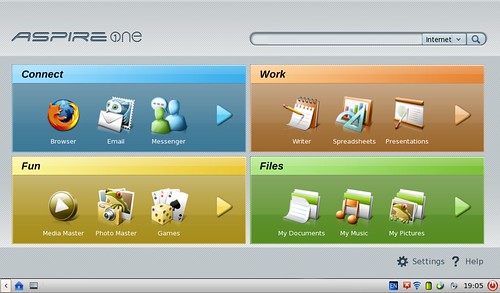
As an experiment, I wiped the hard disk of one aspire and replaced it with Acer’s custom Linpus – which boots up in about 15 seconds and points you straight to the basics of Firefox, Open Office, etc. on the one screen. Most kids and teachers I know who have never used Linux are able to do the most common things with this distro fairly easily. The same could be said of eee’s Xandros. The opening screens in both distros are extremely simple to follow – and when your main focus is the web, there’s little more you need to worry about other than clicking on the ‘web’ icon:
I think bringing Linux into the mix is – part and parcle with netbooks generally – about focusing on the ‘less is more’ principle. Seeing that all the applications are mostly web-based brings the focus on collaboration.
At the same time, focusing less on say making a song or editing swathes of video makes you appreciate simple things like online forums, RSS feeds, wikipedia pages and so on. There’s so much to be gained from the simple things on the web, and the more we look at the simple things, the more we realise how sophisticated those things can be.
Finally, I’d like to suggest that bringing Linux into a school and/or individual classroom is to some extent a political choice, regardless of our views. I think there’s a lot to be gained simply teaching others about the world of open source especially given that the vast majority of computer users don’t really know what the term is and have been reared on Microsoft or Apple products from day one. The fact that open source represents a viable and powerful alternative to proprietry solutions is amazing in itself – not to mention the fact that Linux is the technology backbone of the developing world.
For more thoughts on Linux in education, check out Clarence Fisher’s post in Remote Access.